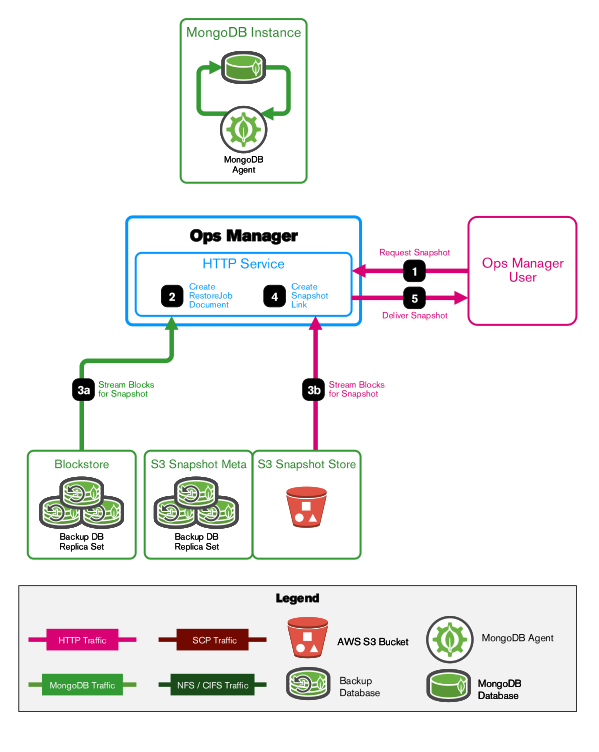
To restore a snapshot using HTTP, Ops Manager creates and displays a download link to the appropriate snapshot in snapshot storage.
After clicking the download link, Ops Manager streams the snapshot to the target snapshot host.
Note
PIT restores include points in time and oplog timestamps.
Considerations
When you request a point-in-time restore, the restore dialog shows the restorable time ranges for the selected deployment. These ranges represent the periods for which Ops Manager has a complete and continuous oplog history. You can only choose a restore time that falls within one of these ranges.
Oplog gaps can occur in the following situations:
The oplog tailing stops because of an issue with a backup job tailing the oplog, and the oplog rolls over before MongoDB Agent tails it again.
A topology change occurs, until Ops Manager completes a new snapshot.
A FCV change occurs, until Ops Manager completes a new snapshot. You cannot apply a point-in-time restore across MongoDB version changes.
A restore completes, until Ops Manager completes a new snapshot.
If the restore time you need is not available in the dialog, investigate recent topology or FCV changes and review backup job history to understand why that period is not restorable.
For example, the restore dialog might show these restorable time ranges:
June 8th 13:45:03toJune 8th 17:45:03June 8th 19:45:03toJune 9th 07:45:03
In this case, you cannot restore to any time between June 8th 17:45:03 and June 8th 19:45:03 because an oplog gap exists for that period.
You can request a point-in-time restore to a specific point in time that includes stale data.
Procedure
The user selects a timestamp:
Through the Ops Manager application:
Click on a timestamp.
Submit their request.
Through the API:
Find the cluster to restore.
Create new Restore Job for that cluster.
Ops Manager creates a RestoreJob document.
Ops Manager sets the RestoreJob document status to Transferring... and starts streaming the snapshot in the requested format from the snapshot store to Ops Manager. Each Snapshot Store streams its snapshot components through Ops Manager:
A blockstore streams blocks.
A S3 snapshot store streams the blocks.
With the status set to Waiting for Customer..., Ops Manager creates a URL.
The user clicks the get link link, then Download in the Ops Manager application to download the snapshot.
The user downloads the MongoDB Backup Restore Utility from the Ops Manager application to the target snapshot host.
Note
The MBRU can be used with any restore. If the utility is installed on the host where you want to restore the snapshot, the user doesn't need to download it again.
The user starts a temporary MongoDB instance on the target snapshot host. The fetched oplog is applied to the snapshot restored to this instance.
The user runs the MBRU to request the oplog.
The MBRU fetches the oplog for the point-in-time snapshot.
The MBRU applies the oplog to snapshot in the temporary MongoDB instance.
The user exports the restored database from the temporary MongoDB instance.